Gaming Store Colored Icons for Effortless Design
Clean, colorful visuals can make or break a project. Whether you are building a gaming website, designing a mobile app, creating social media posts, or preparing a printed flyer, the right set of icons saves time and elevates your work. Gaming Store Colored Icons offers a collection of high-quality vector graphics designed to fit a wide range of uses. With a simple and clean design, these icons are ready to drop into any project and easy to customize using standard vector software. This article explores what these icons include, how different people can benefit from them, and what to consider when choosing them for your own work.
What Are Gaming Store Colored Icons?
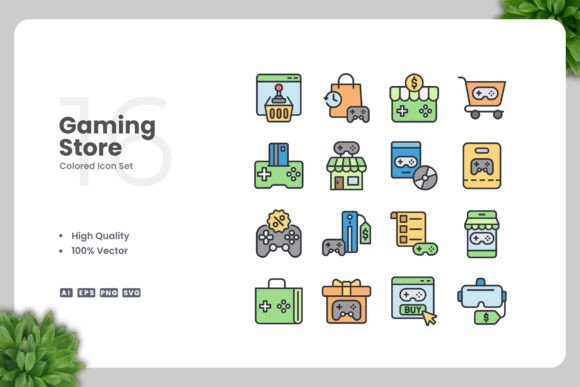
This icon set features a series of colored graphics related to gaming stores and gaming culture. Each icon is a vector file, meaning it can be resized without losing quality and edited to change colors, sizes, or other elements. The collection includes source files in Adobe Illustrator (AI), EPS version 10, SVG, and PNG with transparent backgrounds. A Readme.txt file provides basic instructions. The design style is modern, clean, and visually appealing, making it suitable for both digital and print projects. Because everything is vector-based, you can easily adjust icons to match your brand colors or layout requirements using tools like Adobe Illustrator or CorelDRAW.
Who Can Use These Icons and Why?
Different people approach icon sets with different needs. While a beginner might prioritize simplicity and ease of use, a professional may focus on flexibility and file compatibility. Below are several audience perspectives to help you see whether this set aligns with your goals.
Beginners and Hobbyists
If you are new to design or working on a personal project, the drag-and-drop aspect of these icons is especially helpful. The PNG files with transparency let you immediately use them in presentations, social media graphics, or simple blog posts without needing any special software. For example, a hobbyist running a small gaming review blog could use the controller icon as a bullet point in a list of top games, or the storefront icon to highlight a sale. The Readme.txt gives you basic guidance, so you do not feel lost. The vector files might feel intimidating at first, but they are there for when you want to explore editing later. This set gives beginners room to grow without overwhelming them.
Freelancers and Creators
Freelance designers and content creators often need versatile assets that work across multiple client projects. The ability to change colors directly in Adobe Illustrator or CorelDRAW means you can quickly adapt the same icon set for a gaming store's website, a social media campaign for a new game release, or even an infographic about gaming statistics. For instance, you might use the headset icon in a blog post about streaming gear, then later recolor it to match a client's brand for a printed banner. The SVG format also ensures that icons remain crisp on high-resolution screens. This flexibility saves time and reduces the need to purchase separate icon packs for each project.
Small Business Owners and Entrepreneurs
Business owners who manage their own marketing materials appreciate resources that are both cost-effective and professional. Gaming Store Colored Icons can be used in email newsletters, product cards, posters, and even on packaging. A local game store owner could create a flyer advertising a tournament using the keyboard, mouse, and trophy icons. Because the icons are vectors, printing them at large sizes for banners or window decals remains sharp. The ease of resizing and recoloring means you can maintain a consistent look across all your materials without hiring a designer for every small task. The commercial value here is clear: one set covers many needs.
Educators and Trainers
Teachers and trainers who create learning materials about gaming, digital literacy, or graphic design can use these icons to make content more engaging. For example, an instructor preparing a presentation on game development could use icons to label different roles (artist, programmer, tester) or to illustrate steps in a process. The SVG files work well in online course platforms, while the PNG versions are easy to embed in PDF handouts. The learning value extends to teaching students about vector graphics themselves—showing how to change colors and export icons for different uses. The clean design avoids visual clutter, which helps students focus on the concepts rather than distracting artwork.
Marketers, Bloggers, and Social Media Managers
For those who need to produce frequent visual content, consistency and speed matter. Gaming Store Colored Icons provide a unified style that can be used across blog featured images, Instagram posts, Facebook ads, and Pinterest pins. A marketer promoting a gaming event might create a series of posts using different icons (controller, joystick, headphones) with a common color scheme. Because the icons are colored and clean, they already stand out without extra embellishment. The PNG transparency makes compositing straightforward, while the SVG files allow further refinement if needed. The reliability of vector files ensures that your graphics look the same on all devices, from mobile screens to desktop monitors.
Key Features and File Types Explained
Understanding what comes in the package helps you decide if it fits your workflow. The set includes:
- Source File Ai – Adobe Illustrator original file, fully editable.
- EPS Version 10 – Compatible with many vector programs, including older versions.
- SVG File – Scalable vector graphics for web use, responsive design, and modern apps.
- PNG Transparency – Ready-to-use raster images with no background.
- Readme.txt – Basic instructions for opening and editing files.
All files are 100% vector and 100% customizable. You can change colors, resize elements, and even combine icons to create new symbols. The high quality design means each icon is drawn with attention to detail while maintaining simplicity. Because everything is vector, you never have to worry about pixelation when scaling up for a banner or down for a mobile icon.
Priorities: What Different Users Value Most
Not everyone looks for the same thing in an icon set. Here is how different priorities often align with specific user groups:
- Ease of use – Beginners and busy business owners appreciate the PNG files that work instantly. No software installation is required for basic use.
- Flexibility – Freelancers and designers value the AI and EPS source files that allow total control over color and shape. They can repurpose the icons across many projects with minimal effort.
- Quality – Professionals and educators need clean, consistent vector art that prints well and looks sharp on screen. The simple design style ensures icons are recognizable even at small sizes.
- Commercial value – Entrepreneurs and marketers want a one-time purchase that covers many use cases, reducing long-term costs. This set provides broad utility without recurring fees.
- Learning value – Hobbyists and students can use the files to learn vector editing basics. Opening an AI file and experimenting with color changes is a hands-on way to improve skills.
- Speed – Social media managers and bloggers need assets they can drop into projects immediately. The PNG transparency and SVG format allow quick integration into common tools like Canva or WordPress.
Making the Most of Gaming Store Colored Icons
To get the best results, start by identifying your primary use case. If you only need icons for a single project, the PNG files may be sufficient. If you expect to reuse icons in different colors or sizes, invest a few minutes learning to use the vector files. Open the AI or EPS file in Adobe Illustrator or CorelDRAW—both applications let you select individual icons, change their fill color, and scale them arbitrarily. Many programs also support SVG files directly; you can drag an SVG into a web page and style it with CSS if you know how.
Consider organizing the icons in a folder that groups them by theme (e.g., hardware, accessories, storefront). This habit saves time when you need a specific graphic later. If you collaborate with a team, sharing the source files ensures everyone uses consistent artwork. For print projects, always work from the vector files to guarantee high resolution. For digital projects, the SVG format is often best because it stays sharp on retina displays and can be animated with simple code if desired.
Finally, remember that customization is a strength. Do not hesitate to pair icons with your own typography, backgrounds, or other visual elements. The clean design of Gaming Store Colored Icons acts as a flexible foundation—it can look playful or professional depending on how you use it. Whether you are a teacher preparing a slide deck or a small business owner designing a poster, these icons give you a reliable starting point that saves time and improves your final output.
Upnowgraphic has designed this set with everyday creators in mind. By providing multiple file formats and a simple, colorful style, the icons support a wide spectrum of projects—from digital content to printed materials. If you value customization, quality, and versatility, this icon set may be exactly what you need for your next gaming-focused design.