SciFi HUD Interface Frames for Gaming & Design
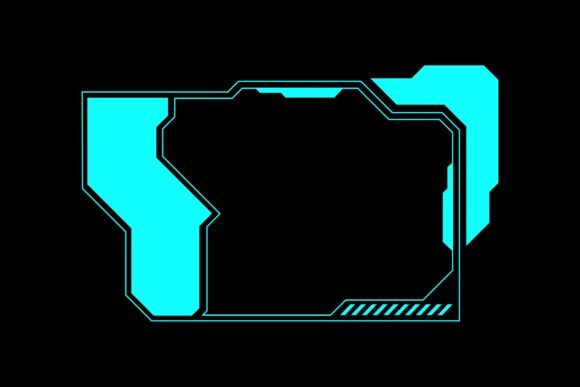
Imagine you are designing a futuristic gaming stream, a cyberpunk-themed poster, or even a custom t-shirt for a sci-fi event. You need that instantly recognizable look—the glowing lines, the angular frames, the digital readouts that scream advanced technology. This is exactly what a SciFi HUD Interface Frame Gaming Overlay delivers. It is a ready-made graphic element that mimics the heads-up displays you see in space simulators, tactical shooters, and sci-fi movies.
Rather than building every line, grid, and data point from scratch, you get a complete set of vector artwork that you can drop into your project. The overlay acts as a visual shortcut to a high-tech aesthetic, saving you hours of design work while giving your project a polished, professional edge.
What Makes This Overlay Different from Basic Clip Art?
Not all graphics are created equal. This particular collection stands out because it is built as a vector set. Instead of a single static image, you receive 100 individual source files in EPS format, plus a high-resolution JPG for quick previews or immediate use. The vector nature means you are not stuck with a fixed size or color. You can open any file in software like Adobe Illustrator, Inkscape, or CorelDRAW and start editing immediately.
You can rescale the frame to fit a billboard or shrink it down for a sticker without losing any sharpness. You can recolor the neon green lines to match your brand's blue and orange palette. You can even delete elements you do not need or add your own text inside the data panels. This flexibility is what separates a versatile design tool from a one-time-use graphic.
Core Characteristics That Add Value
- Scalability: Vector files remain crisp at any size, so the same frame works on a phone wallpaper and a large event banner.
- Editability: Every element is grouped and layered, making it simple to hide, recolor, or reposition parts.
- Variety: With 100 different frames, you have options for full-screen overlays, corner accents, circular targeting reticles, and data dashboard layouts.
- Immediate usability: The included high-resolution JPG lets you test the aesthetic or use it directly in applications that do not support vector files.
Why Creators and Small Business Owners Are Turning to Vector Overlays
If you have ever tried to design a futuristic interface by hand, you know it is painstaking work. Aligning lines, matching angles, and keeping everything consistent takes time. For a freelancer working on a tight deadline or a small business owner designing merchandise, that time is better spent on other tasks. A well-made overlay removes the technical hurdle.
It also solves a common frustration: finding graphics that look truly high-tech without being cluttered or amateurish. Many free overlays are low-resolution, badly drawn, or locked into unchangeable colors. This collection gives you professional-grade assets that you can tailor to your exact needs.
Entrepreneurs selling custom apparel appreciate that they can open a file, change the color to match their ink options, and export it directly to their printing service. Educators teaching graphic design use the overlays as starting points for lessons on composition and styling. Bloggers and marketers use them to create eye-catching social media headers or video title cards.
Apparel and Merchandise
The most straightforward application is printed goods. Because the files are vectors, you can scale each frame to fit the print area of a t-shirt, pillow, bag, or mug. A large, bold HUD frame across the back of a hoodie creates a striking design. A smaller, subtle corner frame on a tote bag adds a tech-inspired accent without overwhelming the fabric. Stickers and decals also benefit from the crisp lines that vectors provide.
Digital Content and Streaming
For streamers and video creators, a SciFi HUD Interface Frame Gaming Overlay is practically a necessity if you want a sci-fi or gaming theme. You can use it as a border around your webcam feed, a background element on your starting soon screen, or a data panel to display your social media handles in a thematic way. The editability allows you to add your own text, such as stream schedules or subscriber counts, directly into the frame's data areas.
Print and Marketing Materials
Flyers for a gaming tournament, posters for a tech conference, or banners for a LAN party all benefit from a cohesive futuristic design language. Instead of hiring a designer to create a custom interface from scratch, you can select an overlay, adjust it to your brand colors, and have print-ready artwork in minutes. The high-resolution JPG serves as a quick mockup to show clients or team members before committing to the final vector edit.
Educational and Training Contexts
Teachers and trainers use these overlays to create engaging presentation slides or handouts. A slide about data analysis feels more immersive when framed by a glowing HUD. An infographic about network security gains visual punch when integrated with a cybernetic frame. Because the files are easy to edit, you can remove distracting elements and keep only the parts that support your lesson.
Personal Projects and Hobbies
Hobbyists building a custom gaming PC often create themed decals for their case. A carefully chosen HUD frame applied as a vinyl decal transforms a plain black case into something that looks like it belongs on a spaceship. Likewise, cosplayers use these vector frames as templates for prop screens or costume details, scaling and printing them onto materials like acrylic or cardboard.
What You Actually Get in the Download
The package is straightforward. You receive 100 vector source files in EPS format. EPS is a widely supported vector format that opens in almost any professional graphics application. Alongside the vectors, you get a high-resolution JPG file that shows a preview of every frame. This JPG is handy for quickly browsing your options without opening each EPS file individually.
Because the files are vectors, you are free to transform them in any way you need. Scale them up or down. Remove individual lines or entire sections. Add your own text, logos, or icons. Recolor every element without degradation. The quality remains intact no matter how many times you edit the file.
Important Considerations Before You Start
While these overlays are highly versatile, a few points will help you get the best results.
Software Requirements
To unlock the full potential of the vector files, you need vector graphics software. Adobe Illustrator is the industry standard, but free alternatives like Inkscape or vector editing tools within Affinity Designer work perfectly as well. If you do not have access to any vector software, you can still use the included high-resolution JPG for projects where raster images are acceptable.
Understanding Layers and Groups
When you first open an EPS file, it may look like a single complex object. In most software, you will find that the design is built from multiple layers and grouped elements. Take a few minutes to ungroup and explore. This is where the real flexibility lives. You might discover hidden details you can repurpose for other parts of your project.
Color Considerations for Print
If you are printing on fabric or merchandise, remember that screen colors may not match ink colors exactly. Before sending a file to a printer, convert the design to your printer's preferred color space, typically CMYK. The vector format makes this conversion clean and lossless.
Start Simple
If you are new to working with vectors, pick one frame and experiment. Try changing the color of a single line, then try scaling the whole overlay. Add a piece of text inside a data panel. These small experiments build confidence and show you how much control you truly have.
A Tool That Grows with Your Skills
Whether you are a complete beginner making your first custom shirt or a seasoned professional building a brand identity for a tech startup, a collection like this adapts to your level of experience. Beginners appreciate that they can use the JPG directly or make simple color changes in a few clicks. Advanced users dive into the layers, combine multiple frames, and create entirely new compositions from the provided elements.
The SciFi HUD Interface Frame Gaming Overlay is not just a decorative element; it is a starting point. It gives you a professional foundation so you can focus on the creative parts that matter most to your project. And with 100 different frames included, you have a library of sci-fi aesthetics ready to deploy at a moment's notice.