Turbo Gaming Sport 3D Text Effect for Bold Designs
Creating eye-catching titles, logos, and banners often feels like a challenge when you lack advanced design skills or hours to spare. The Turbo Gaming Sport 3D Text Effect offers a practical shortcut to professional-looking text that commands attention. Whether you are building a gaming channel, promoting an esports event, or simply experimenting with sporty typography, this editable vector design makes the process straightforward and enjoyable.
What Makes This 3D Text Effect Stand Out
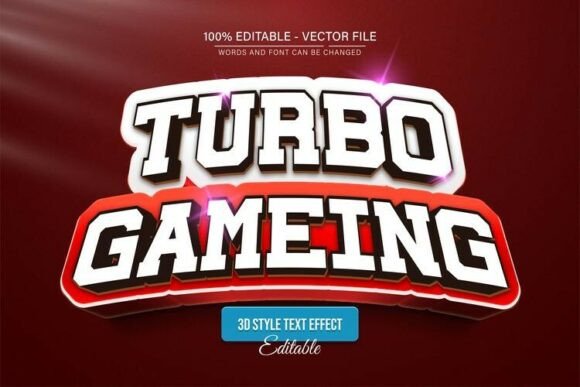
At its core, the Turbo Gaming Sport 3D Text Effect is a pre-built vector style that gives your words a dynamic, dimensional look with racing-inspired energy. The text appears to leap off the page or screen, combining bold lettering with layered shadows, angled perspectives, and sporty accents. Because it is fully editable in Adobe Illustrator, you are not stuck with a static image. You can type your own custom words, adjust the size, and tweak colors without losing quality. This flexibility is especially valuable for anyone who needs consistent branding across different projects.
The design retains crisp edges and sharp details no matter how much you enlarge or reduce it. That means a small social media icon and a large event poster both look equally polished. For creators who have experienced pixelation or blurry results when resizing raster graphics, this vector approach solves a major frustration.
Who Benefits from This Design Resource
Beginner designers and hobbyists often struggle with creating complex 3D effects from scratch. This file removes the guesswork. You open it, edit the text, and instantly get a result that looks like it took hours of manual work. There is no need to master advanced Illustrator techniques or understand layers, gradients, or blending modes.
Freelancers and small business owners can use the Turbo Gaming Sport 3D Text Effect to produce branded content quickly. A gaming coach, an esports merchandise seller, or a local tournament organizer can generate promotional materials without outsourcing the design work. The unlimited color variations mean you can match your existing brand palette or experiment with different moods.
Marketers and content creators who produce YouTube thumbnails, Twitch overlays, or social media posts will find this effect especially useful. Bold, dimensional text stands out in crowded feeds and helps your content get noticed. The sporty, high-energy vibe fits gaming content, fitness challenges, sports events, and even automotive or racing themes.
Educators teaching graphic design fundamentals can also use this file as a teaching tool. Students learn how editable vectors work, practice changing text and colors, and see firsthand how scalable graphics maintain quality.
Practical Uses Across Projects
The versatility of this text effect means you can apply it in many contexts. Here are a few realistic examples.
- Gaming channel branding: Use the effect for your channel name, video titles, or intro sequences. The sporty 3D look aligns well with racing games, action titles, and competitive content.
- Event promotions: Design flyers, social media graphics, or digital banners for LAN parties, esports tournaments, or gaming conventions. The bold lettering ensures key details are readable even from a distance.
- Merchandise mockups: Create text designs for t-shirts, hoodies, stickers, or posters. Since the file is vector-based, you can scale it to fit different product formats without quality loss.
- Personal projects: Build a custom logo for your gaming team, a profile header for your social accounts, or a striking title for a personal blog about sports or gaming.
- Local business signage: If you run a gaming lounge, an arcade, or a sports equipment store, this text effect can be adapted for in-store signage, window decals, or digital menus.
What You Get in the Download
The package includes both EPS and JPG formats, so you have flexibility depending on your workflow. The EPS file opens cleanly in Adobe Illustrator CS or higher, and the JPG version works as a quick preview or reference. Font information is also supplied, including details about free fonts you can use to match the original style. Having the font info saves you the time of hunting down the exact typeface later.
Because the vector file is fully editable, you can change the text to anything you want. The color variations are virtually unlimited. You can apply team colors, brand hex codes, or seasonal palettes with just a few clicks. The editing process is straightforward enough that even someone opening Illustrator for the first time can follow along.
How to Edit the Text Effect
Modifying the design follows a simple three-step process.
- Open the EPS file in Adobe Illustrator CS or a higher version.
- Press the T key on your keyboard to activate the Type tool, then click directly on the text in the design.
- Type your own words and adjust the text effect as needed. You can change colors, resize elements, or reposition components to suit your layout.
That is all it takes. There is no complicated setup, no hidden steps, and no requirement to understand advanced vector editing. The file is built to be intuitive, which is why it works well for beginners and busy professionals alike.
Important Considerations Before Using the File
While the Turbo Gaming Sport 3D Text Effect is straightforward, a few points are worth keeping in mind to get the best results.
Software compatibility: The EPS file requires Adobe Illustrator CS or newer. If you use another vector program, it may not support all editable features. Stick with Illustrator for the full experience.
Font availability: The original design uses free fonts, which are specified in the download. If you want to maintain the exact look, install those fonts before editing. Otherwise, you can substitute any typeface you prefer.
Color adjustments: Although the file supports unlimited color variations, plan your palette ahead of time. Using too many conflicting colors can reduce the impact of the 3D effect. Stick with two or three complementary tones for maximum readability.
Use in commercial projects: Since this is a purchased design resource, check the license terms if you plan to use it for client work, merchandise for sale, or other commercial applications. Most vector packs allow commercial use, but it is always wise to confirm.
Scale with intention: The vector file maintains quality at any size, but extremely small sizes may lose some detail in the 3D shading. Test your output at the actual dimensions you plan to use, especially for icons or small badges.
Why Editable Vectors Matter for Your Workflow
One of the greatest advantages of this design is that it never loses quality when scaled. Raster images like JPEGs or PNGs become blurry or pixelated when you enlarge them beyond their original resolution. Vector graphics, on the other hand, rely on mathematical paths that stay sharp at any size. This makes the Turbo Gaming Sport 3D Text Effect a reliable asset for projects that require multiple sizes, from web graphics to large-format prints.
Additionally, the ability to edit the text means you can reuse the same effect for different clients, campaigns, or personal projects. Instead of starting from scratch each time, you open the file, change the wording, and export a fresh design in minutes. Over time, this efficiency adds up, especially if you produce content regularly.
Getting Started with Confidence
If you are new to using vector effects, the Turbo Gaming Sport 3D Text Effect is an excellent starting point. The file is designed to be approachable, with no skill requirement beyond basic familiarity with Illustrator. Even if you only know how to open a file and type text, you can achieve professional-looking results.
Take a few minutes to explore the layers and appearance panel in Illustrator once you open the file. You will see how the 3D effect is constructed, which can teach you useful techniques for future projects. The more you experiment with colors, scaling, and placement, the more natural the editing process becomes.
For experienced designers, this resource works as a time-saver. Instead of building a 3D text effect from scratch, you have a solid foundation to customize further. You can add extra details, combine it with other graphics, or adjust the perspective to fit a specific composition.
The Turbo Gaming Sport 3D Text Effect delivers exactly what it promises: a high-quality, editable, and scalable design that brings your words to life. Whether you are creating content for a gaming community, promoting a sporty brand, or just having fun with typography, this file removes the technical barriers and lets you focus on the creative part.